
Feather Password Manager
A lightweight password manager that stores encrypted passwords locally in your browser. Generate secure passwords and manage credentials without requiring any backend server.
About Feather Password Manager
Feather Password Manager lets you generate strong passwords and store your credentials entirely inside your browser — no account required, no data sent to any server. Every password is encrypted locally, so your vault never leaves your device. It's a stripped-back tool that does exactly what it promises and nothing more.
If you've been putting off replacing weak or reused passwords, this is a low-friction place to start. Paste in a site name, generate a randomized password, and save it — all within seconds. Because everything stays client-side, it fits naturally alongside other privacy-focused tools you might already use.
Works best on desktop where you can keep a browser tab open alongside your other accounts; there's no mobile sync or cloud backup by design, so treat your browser session as the single source of truth.
Look inside
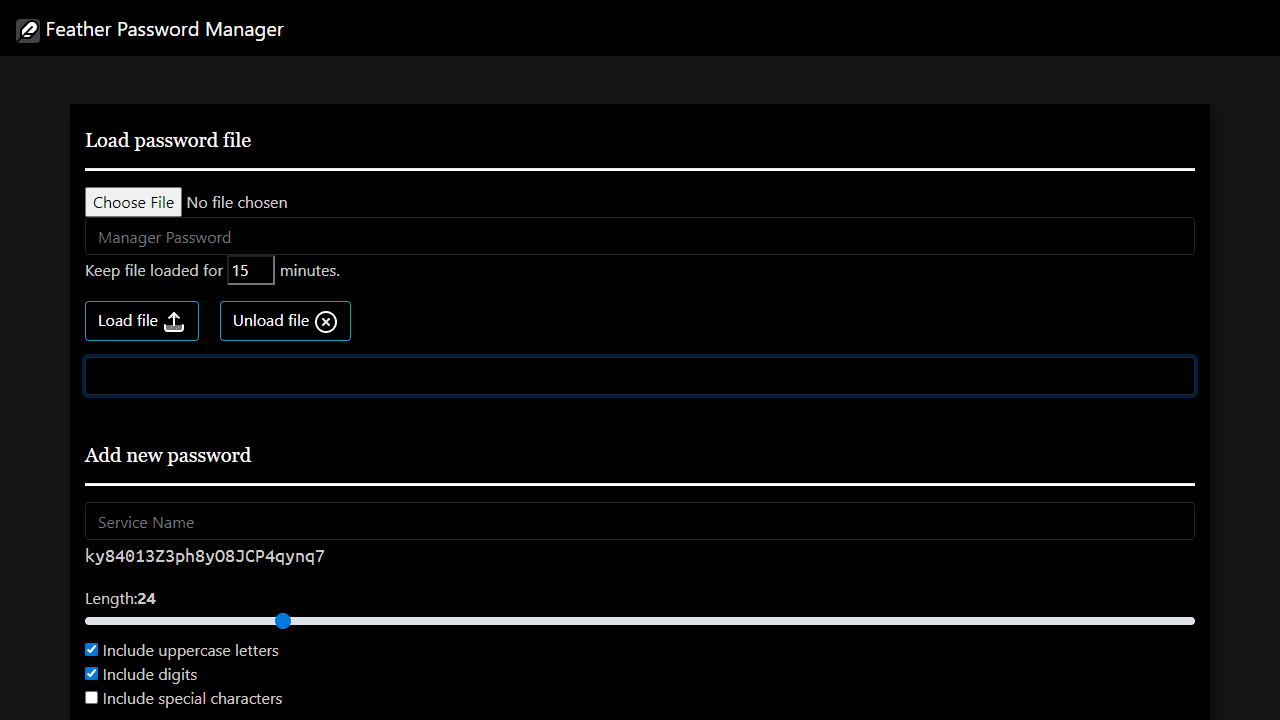
How to use
This is a lightweight password manager that stores encrypted passwords locally in your browser. Getting started: 1. Enter a manager password in the top text box - you'll need this to decrypt your file later 2. Create your first password by typing a service name in the "Service Name" field 3. Adjust password settings using the length slider and checkboxes for uppercase, digits, and special characters 4. Click "Save Password" to add it to your collection Managing passwords: • Click "Download current file" to save your encrypted password file as "passwords.txt" • Use "Load file" to import a previously saved password file • Enter your manager password and click "Load file" to decrypt and view stored passwords • Use the search box to quickly find specific services • Click the clipboard icon next to any password to copy it • Click the eye icon to show/hide password text • Click the X icon to delete unwanted passwords Important notes: • Changes aren't saved automatically - download the file again after making modifications • Your manager password encrypts everything - don't forget it • Files auto-unload after 15 minutes for security
Reviews
No written reviews yet. Be the first!
More from Tools

A witchy weather app where Morgana the Witch peers into the meteorological beyond. Get current conditions, hourly forecasts, and a 7-day outlook for any city in the world — then check back tomorrow to see if the Witch's prophecy held, or if she "cast a spell" to change the weather.
by mercury


