
Font Pairing Studio
Browse 1,900 Google Fonts, preview heading and body combinations live, and copy the CSS snippet for your project.
About Font Pairing Studio
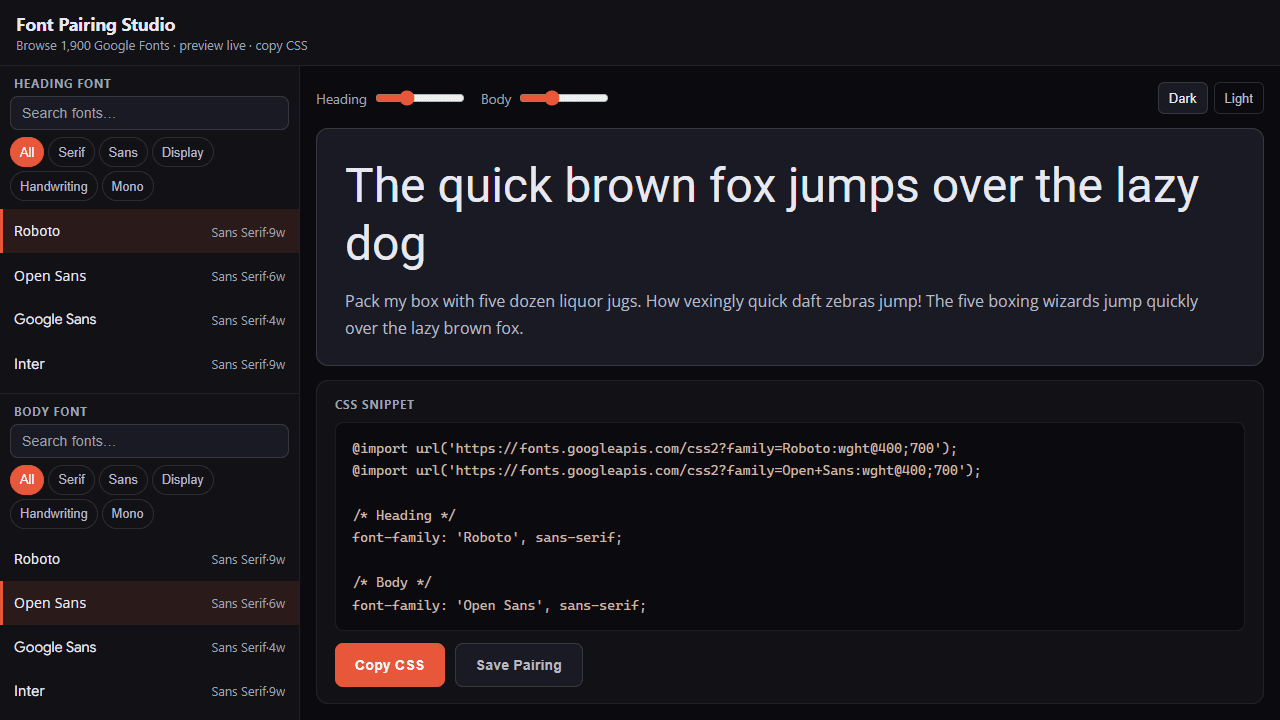
Pick a heading font, watch it render instantly against a body font beneath it, then grab the CSS @import snippet and drop it straight into your project. Font Pairing Studio gives you the full 1,900-font Google Fonts library to browse, with live side-by-side previews that update as you click — no reloading, no guessing how two typefaces will actually sit together on a page.
It's built for the moment when you know the design almost works but the typography is letting it down. Swap the body weight, nudge the heading to a serif, compare three combinations in a row — the workflow is fast enough that you can make real decisions rather than just browse. The preview panel renders both sizes together, so you see hierarchy, not just individual glyphs.
Part of the broader tools collection on Launch Arcade. If color choices are the next thing on your list, Color Picker is worth a look. Font Pairing Studio works best on a desktop or laptop, where the side-by-side preview has enough horizontal room to show heading and body text at realistic proportions.
Look inside
How to use
Create custom font combinations by selecting heading and body fonts from 1,900 Google Fonts. • Browse fonts in the left panels - use search boxes or category chips to filter • Click any font to select it for heading or body text • Adjust font sizes using the sliders at the top • Toggle between dark/light preview backgrounds • Edit the preview text directly by clicking on it • Copy the generated CSS code to use the pairing in your projects • Save favorite combinations - they'll appear as clickable cards below the CSS • Delete saved pairings by clicking the X on their cards The tool automatically generates the necessary CSS imports and font-family declarations. All pairings are stored locally in your browser.
Reviews
More from Tools

A witchy weather app where Morgana the Witch peers into the meteorological beyond. Get current conditions, hourly forecasts, and a 7-day outlook for any city in the world — then check back tomorrow to see if the Witch's prophecy held, or if she "cast a spell" to change the weather.
by mercury


