Solar System Explorer
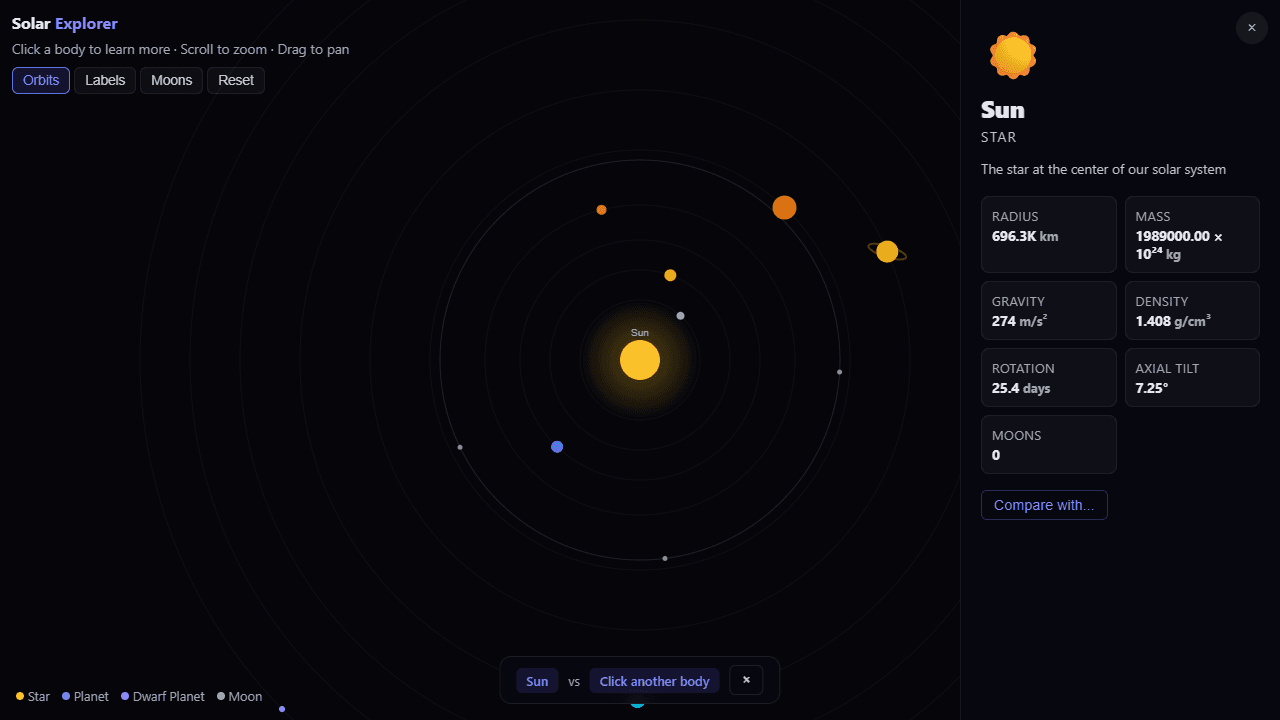
Interactive animated solar system with 27 celestial bodies. Click planets and moons for detailed stats. Compare any two bodies side-by-side. Toggle orbits, labels, and moons.
About Solar System Explorer
Click on Jupiter and you'll see its mass, diameter, gravity, and average temperature laid out instantly — then drag Saturn into the comparison panel to see how the two giants stack up side by side. Solar System Explorer maps all 27 celestial bodies in the solar system, from the Sun down to the smaller moons of Uranus, each with its own detailed stat sheet. The animated orrery lets you toggle orbital paths, body labels, and moon systems on or off, so you can strip the view back to bare planets or layer in every detail at once.
It sits comfortably in education but never feels like a textbook. If you want to go deeper on the mechanics — watching where Mars actually sits in its orbit right now — Solar System pairs well as a follow-up. For this one, a tablet or large monitor makes the comparison feature genuinely useful; on a small phone screen the side-by-side panel gets cramped.
Look inside
How to use
Explore an interactive 3D solar system with detailed information about planets, moons, and celestial bodies. • Click and drag to pan around the solar system • Scroll or use mouse wheel to zoom in and out • Click on any celestial body to view detailed information including size, distance, composition, and moons • Use the control buttons in the top-left corner: - Orbits: Show/hide orbital paths - Labels: Show/hide body names - Moons: Show/hide planetary moons - Reset: Return to default view • Click one body, then another to compare their properties side-by-side • When comparing, a bar appears at the bottom - click "Compare" to see detailed statistics • The info panel on the right shows comprehensive data about the selected body • Color-coded legend at bottom-left identifies different types of celestial objects • On mobile, tap the menu button (≡) to access controls • Close info panels by clicking the × button Goal: Learn about our solar system by exploring planets, their moons, and comparing different celestial bodies' characteristics like size, distance from the sun, and composition.
Reviews
No written reviews yet. Be the first!
More from Education

A geography speed-quiz. Type country names against the clock — every one you nail lights up the map. Eight maps (world + every continent), three paces, leaderboards, percentile standings, and a per-answer rarity stat that shows how many other players named each country.
by geodude