Pathfinding Visualizer
Interactive grid-based pathfinding visualizer supporting A*, Dijkstra, BFS, DFS, and more.
About Pathfinding Visualizer
Drop walls onto a grid, pick a start point and a destination, then watch an algorithm carve its way through the maze in real time. Pathfinding Visualizer lets you switch between A*, Dijkstra, BFS, DFS, and several other algorithms and compare how each one explores — some fan out in every direction, others race straight for the goal. Colored cells show exactly which nodes were visited and in what order, making the logic tangible in a way that textbook diagrams rarely manage.
It's a practical tool for anyone studying computer science education — whether you're preparing for a technical interview, working through an algorithms course, or just curious why GPS routing behaves the way it does. You can add weighted tiles to show how Dijkstra and A* factor in cost, while BFS and DFS ignore them entirely.
Everything runs in the browser with mouse clicks and drags — no setup, no login. It works best on a larger screen where the full grid is visible at once.
Look inside
How to use
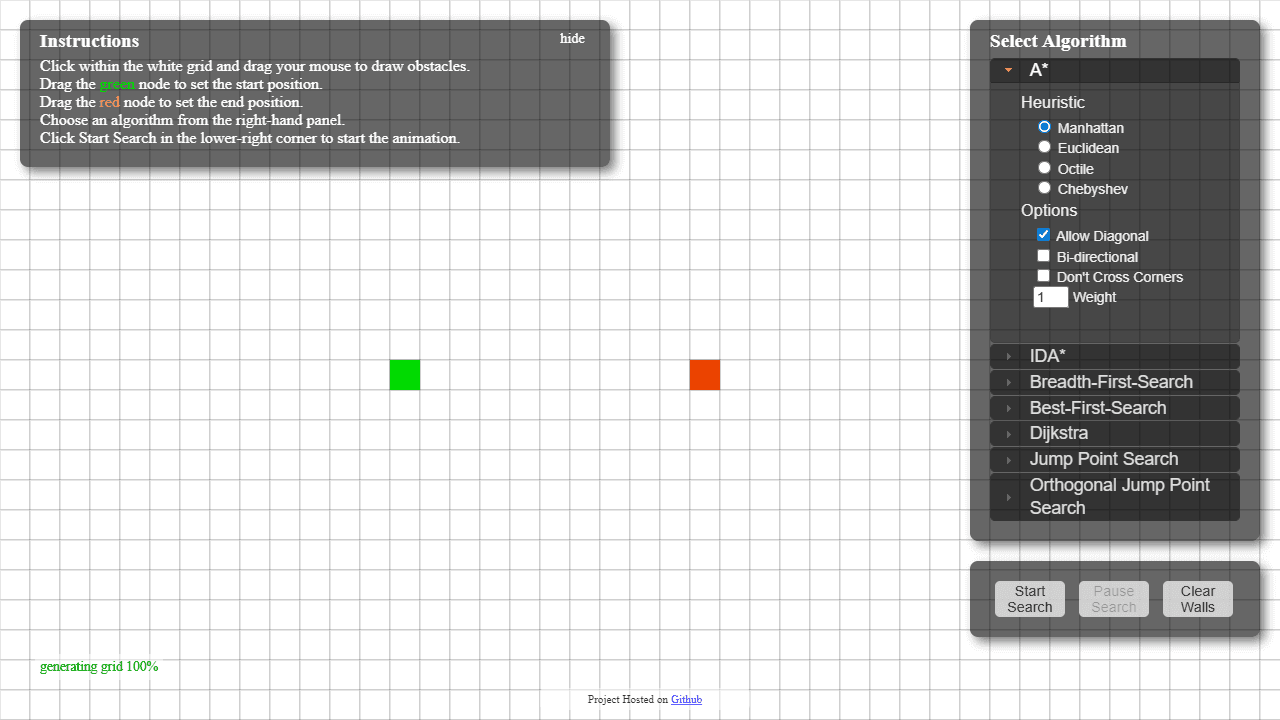
This tool demonstrates different pathfinding algorithms by showing how they search for routes on a grid. • Click and drag on the white grid to draw black obstacles/walls • Drag the green node to set your starting position • Drag the red node to set your destination • Select an algorithm from the right panel (A*, Dijkstra, Breadth-First, etc.) • Adjust algorithm options like allowing diagonal movement or choosing heuristics • Click "Start Search" to watch the algorithm find a path in real-time • Use "Pause Search" to stop the animation • Click "Clear Walls" to remove all obstacles The visualization shows: - White cells: walkable spaces - Black cells: obstacles/walls - Green cell: start position - Red cell: end position - Colored cells during search: areas being explored - Final colored line: the discovered path Different algorithms will search in different patterns and may find different routes. Some guarantee the shortest path while others prioritize speed.
Reviews
No written reviews yet. Be the first!
More from Education

A geography speed-quiz. Type country names against the clock — every one you nail lights up the map. Eight maps (world + every continent), three paces, leaderboards, percentile standings, and a per-answer rarity stat that shows how many other players named each country.
by geodude