
PuzzleScript
An open-source puzzle game editor and engine. Design, build, and play tile-based puzzle games right in the browser.
About PuzzleScript
PuzzleScript puts you in the role of puzzle game designer — you write a few lines of plain-text code describing your tiles, rules, and win conditions, then hit Run and play the result instantly in the browser. The editor and the game run side by side, so tweaking a single rule and seeing it break (or fix) everything is part of the fun. No install, no build step, no prior experience required.
The engine is built around Sokoban-style tile logic, but the rule system is expressive enough that people have used it to recreate classics and build genuinely original mechanics. It's open-source under the MIT license, so anything you make is yours. If you enjoy making things as much as playing them, it fits neatly alongside other creative tools that reward tinkering over passive consumption.
Games are shareable via URL the moment they run, which makes it a surprisingly practical tool for rapid prototyping — a working puzzle concept can go from idea to playable link in under an hour.
Look inside
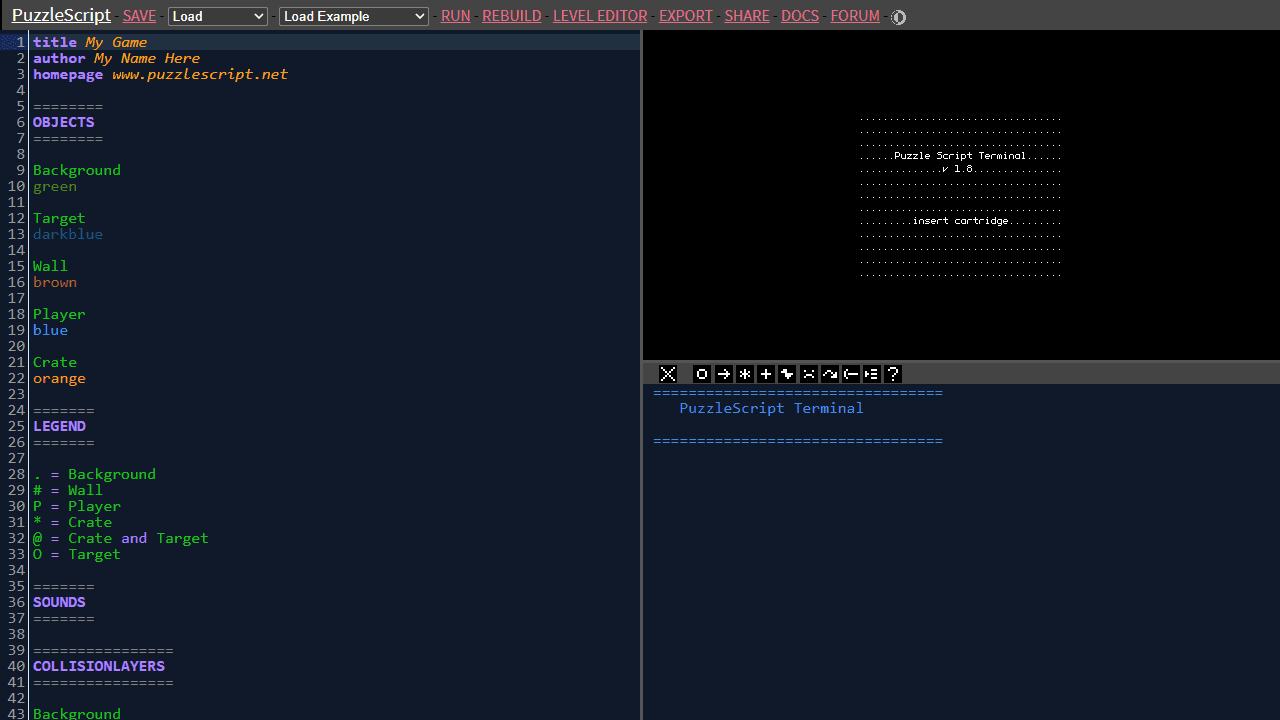
How to use
• **Purpose**: Create puzzle games using a simple scripting language without programming knowledge • **Layout**: Code editor on left, game preview on right, console at bottom • **Getting Started**: - Select "Load Example" dropdown to try existing games - Click RUN to test your game - Use LEVEL EDITOR to design levels visually • **Code Structure**: Write game rules using plain text in sections like OBJECTS (define sprites), LEGEND (assign symbols), RULES (game mechanics), and LEVELS (level layouts) • **Controls While Playing**: Arrow keys to move, Z to undo, R to restart level • **Key Features**: - SAVE/LOAD to manage projects - Sound buttons generate audio effects for your game - SHARE creates playable links - EXPORT builds standalone HTML files - Auto-saves preserve your work • **Shortcuts**: Ctrl+Shift+Enter to run, Ctrl+Enter to rebuild, E for level editor
Reviews
No written reviews yet. Be the first!
More from Creative

A casual chiptune loop maker. Tap cells, pick a vibe, share remixable 16-step loops in under a minute.
by Launch Arcade


